
Services E-Commerce Shopify Website Development E-Commerce SEO Product Marketing Performance...
Read MoreSeptember 03, 2026
How to Build a Website

by Rajesh Kumar
Performance Marketing Specialist | Growth Strategist
Building a website used to require knowing how to code. That’s no longer true. Whether you want a simple online presence for your business, a blog, or a full online store, you can build a working website without touching a single line of code — or you can learn just enough to have full control over how it looks and works.
This guide walks you through the entire process, from deciding what your website is for to launching it and keeping it running smoothly. No jargon left unexplained, no shortcuts skipped.
Table of Contents
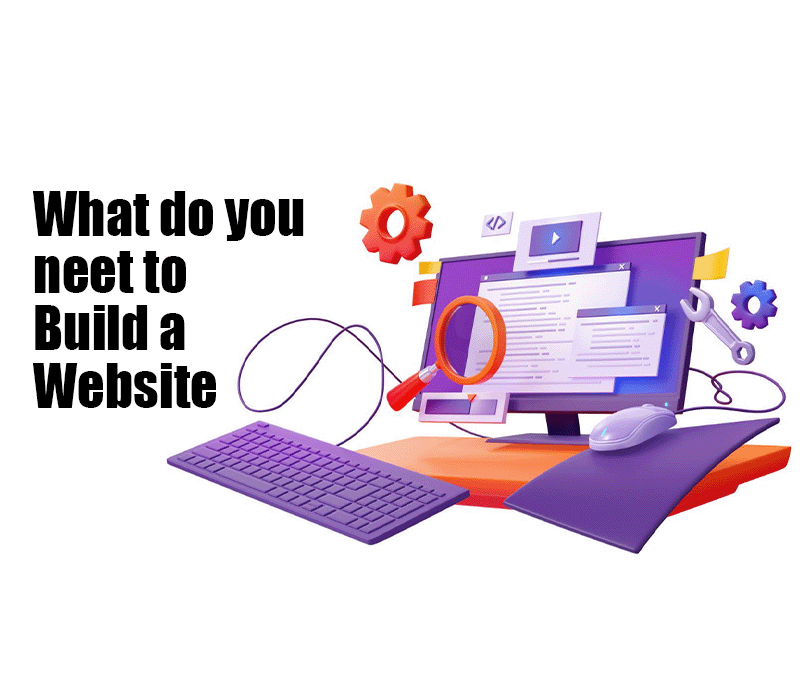
What Do You Need to Build a Website?
Before diving into the steps, it helps to understand the basic building blocks:
You’ll need all six pieces working together. The good news is that most modern platforms bundle hosting, design tools, and SSL into one package, so you’re not managing everything separately
- Domain name – your website’s address (e.g., yourbusiness.com)
- Web hosting – the storage space that keeps your website files online and accessible
- Website platform – the software or tool you use to build and manage the site (like WordPress or a drag-and-drop builder)
- Website design – how your site looks and how visitors move through it
- Website content – the text, images, and information visitors actually read
- SSL/HTTPS – a security certificate that encrypts data between your site and its visitors, shown as the padlock icon in browsers.
You’ll need all six pieces working together. The good news is that most modern platforms bundle hosting, design tools, and SSL into one package, so you’re not managing everything separately
Step 1 — Decide What Your Website Is For
Before choosing any tool, get clear on your website’s purpose. This decision shapes everything that follows.
- Business website – showcases services, builds credibility, generates inquiries
- Blog – publishes articles regularly around a topic or niche
- Portfolio – displays creative or professional work
- E-commerce website – sells products directly online
- Educational website – hosts courses, resources, or learning material
- Personal website – a personal brand, resume, or hobby project
- Landing page – a single, focused page built to promote one offer
A blog and an online store need very different structures, features, and platforms. Defining your purpose first saves you from picking the wrong tool and having to start over.
Step 2 — Choose and Register a Domain Name
A domain name is your website’s unique address on the internet — what people type into their browser to find you. You register it through a domain registrar, and it typically renews annually.
When choosing a domain:
- Keep it short and easy to spell
- Make it memorable — avoid awkward word combinations
- Match it to your brand or business name where possible
- Choose a suitable extension (.com is the most recognized, but .in, .co, .org, or industry-specific extensions like .shop work well too)
Avoid hyphens, numbers that could be misheard, and names too similar to existing brands. If your ideal domain is already taken, try a slight variation rather than a confusing spelling.
Step 3 — Choose Web Hosting
Web hosting is the service that stores your website’s files on servers and makes them accessible to anyone who visits your domain. Without hosting, your website has nowhere to “live.”
Common hosting types for beginners:
- Shared hosting – affordable, suitable for small sites, resources shared with other websites
- Managed hosting – the provider handles technical maintenance, often tailored for specific platforms like WordPress
- Cloud/VPS hosting – more power and flexibility, better for growing or high-traffic sites
For beginners, look for reliable uptime, responsive customer support, straightforward setup, and room to grow. If you use a website builder or many WordPress providers, hosting is often included, so you may not need to shop for it separately.
Step 4 — Choose How You Will Build Your Website
This is the biggest decision you’ll make. There are three main paths.
1. Website Builders (Drag-and-Drop Tools)
Best for: beginners who want a working site fast with minimal setup.
- Advantages: visual editing, built-in hosting and templates, no coding required
- Limitations: less flexibility for custom features, potential to switch platforms later if you outgrow it
- Technical knowledge required: none
2. WordPress
Best for: people who want more control, scalability, and flexibility without full custom coding.
WordPress is a content management system (CMS) — software that lets you create and organize web pages through a dashboard instead of writing raw code. It powers a large share of websites globally and has an enormous ecosystem of themes and plugins.
- Advantages: highly customizable, huge plugin library, strong for blogs and content-heavy sites, good long-term flexibility
- Limitations: steeper learning curve than a pure drag-and-drop builder, you’re responsible for updates and security (unless using managed hosting)
- Technical knowledge required: minimal to moderate
3. Building From Scratch With Code
Best for: developers or anyone wanting complete control over functionality and design.
This involves writing:
- HTML – the structural language that defines the content of a page (headings, paragraphs, images)
- CSS – controls how that content looks (colors, layout, fonts)
- JavaScript – adds interactivity (menus, animations, dynamic behavior)
- Advantages: unlimited customization, no platform constraints
- Limitations: requires real learning investment, slower to build, you handle hosting and security decisions yourself
- Technical knowledge required: significant
Quick comparison:
| Method | Ease of Use | Flexibility | Best For |
|---|---|---|---|
|
Website Builder
|
Moderate |
Limited |
Small sites, quick launch
|
|
WordPress |
Moderate |
High |
Blogs, business sites, growing needs
|
|
Custom Code |
Advanced |
Unlimited |
Developers, unique functionality
|
The Different Types of SEO
SEO is not just one technique—it is a combination of different strategies that work together to help your website rank higher on Google.
To succeed in SEO, you need to understand the four main types of SEO and how they impact your website’s visibility and performance.
Understanding the types of SEO helps you build a strong strategy by combining on-page, off-page, technical, and local optimization techniques.
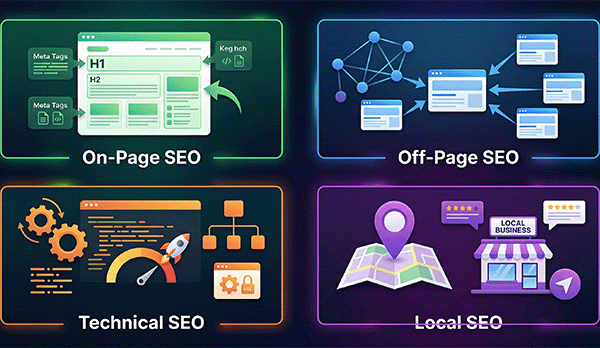
Each type of SEO plays a unique role in helping your website rank higher on Google and attract the right audience.
How Does SEO Work?
On-page SEO focuses on optimizing everything within your website to improve rankings and user experience.
This includes elements like content quality, keywords, headings, internal links, and page structure.
Think of it like cleaning and organizing your room—everything should be easy to find for both users and search engines.
A well-optimized page helps search engines understand your content better and increases your chances to rank higher on Google.
Off-Page SEO
Off-page SEO focuses on activities outside your website that help build your authority and trust in the eyes of search engines.
It is similar to word-of-mouth marketing—the more people talk about your website, the more trustworthy it appears.
One of the most important parts of off-page SEO is backlink building. When other reputable websites link to your content, it acts like a vote of confidence for your site.
Search engines also consider social signals, such as sharing content on platforms like Instagram and LinkedIn, which helps increase visibility and engagement.
Another key factor is online reputation management, which includes getting positive Google reviews and managing your brand mentions across the internet.
Technical SEO
Technical SEO focuses on optimizing the backend of your website so search engines can crawl and index your pages efficiently.
It ensures your website runs smoothly and provides a better experience for both users and search engines.
Some important aspects of technical SEO include:
| Technical SEO include: | |
|---|---|
|
Website speed |
Faster loading pages reduce bounce rates and improve rankings. |
|
Mobile-friendliness |
Optimizing your site for mobile users, as most searches now happen on mobile devices. |
|
HTTPS security (SSL) |
Securing your website to build trust and protect user data. |
|
Sitemaps and robots.txt |
Helping search engines understand your website structure and crawl it effectively. |
Local SEO
Local SEO helps businesses appear in search results for a specific location, making it ideal for local services and shops.
helps businesses appear in search results for a specific location, making it ideal for local services and shops.
For example, when someone searches for a “dentist near me” or “real estate agent in Delhi”, local SEO determines which businesses appear.
To succeed in local SEO, you need to focus on the following key factors:
| Key Elements of Local SEO That Improve Your Rankings | |
|---|---|
|
Google Business Profile (GBP) |
Creating and optimizing your profile to appear in the local map results. |
|
Local citations |
Keeping your business name, address, and phone number consistent across directories. |
|
Geo-targeted content |
Creating content focused on your city or region to attract local customers. |
Local SEO helps businesses appear in Google Maps and local search results.
Keyword Research Explained
Keyword research is the process of finding the exact words and phrases people use to search on Google.
In today’s SEO, it is not just about search volume—it’s about understanding user behavior and what people are actually looking for.
The keyword funnel helps you understand how users move from learning to buying, allowing you to target the right keywords at each stage.
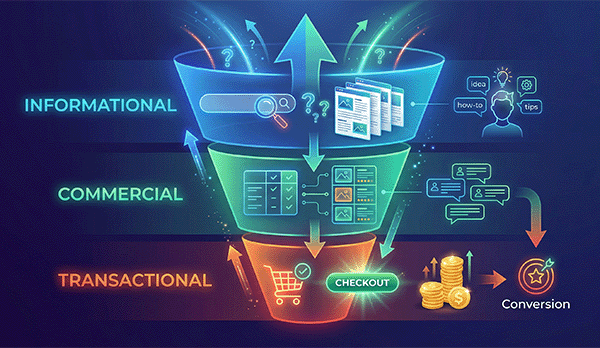
By focusing on search intent, you can create content that attracts both traffic and conversions.
However, SEO is not just about keywords—it also involves technical optimization, content quality, and user experience.
The Keyword Metrics You Must Know
To choose the right keywords, you need to understand these important metrics:
- Search Volume – The number of times a keyword is searched each month. High-volume keywords like “saree” get more traffic, while specific keywords like “hand-woven silk saree Mumbai”have lower volume but higher intent.
- Keyword Difficulty (KD) – Shows how hard it is to rank for a keyword. Beginners should focus on low competition keywords to get faster results.
- Cost Per Click (CPC) – The amount advertisers pay per click. A higher CPC usually means the keyword has strong commercial value.
- Search Intent – The reason behind a search. To rank on Google, your content must match what the user actually wants.
Head Keywords vs Long-Tail Keywords
Understanding the difference between keyword types is essential for building a strong SEO strategy.
- Head Keywords (Short-Tail) – Broad terms like “insurance” or “SEO”. They have high search volume but are very competitive and difficult to rank.
- Long-Tail Keywords – More specific phrases like “affordable health insurance for seniors in Kolkata”. These keywords have lower competition and are easier to rank for, especially for new websites.
Focusing on long-tail keywords helps you attract targeted traffic and build authority over time.
On-Page SEO Techniques
Modern on-page SEO is no longer about keyword stuffing—it’s about creating content that is relevant, helpful, and easy for both users and search engines to understand.
One of the most important parts of on-page SEO today is user experience, which is measured using Core Web Vitals.
A strong on-page SEO checklist ensures your content is properly optimized using elements like headings, meta tags, internal links, and image optimization.
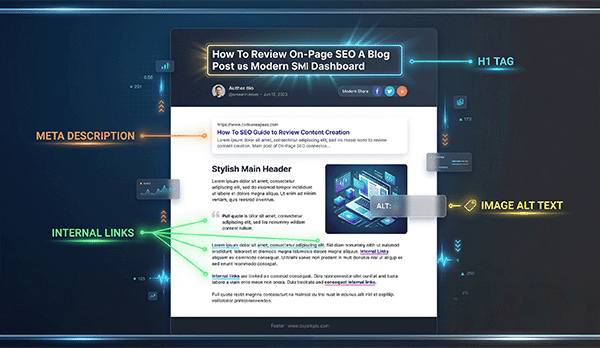
Optimizing these on-page SEO elements helps search engines understand your content and improves your chances of ranking higher on Google.
Core Web Vitals (CWV)
Google uses three key metrics to evaluate how users experience your website in real time:
Core Web Vitals are key technical SEO metrics that measure how fast, responsive, and stable your website is for users.

Improving LCP, INP, and CLS helps enhance user experience and increases your chances of ranking higher on Google.
| Core Web Vitals: The 3 Metrics That Impact Your SEO Rankings | |
|---|---|
|
Largest Contentful Paint (LCP) |
Measures how quickly the main content of your page loads.
Aim for under 2.5 seconds for a good user experience. |
|
Interaction to Next Paint (INP) |
Measures how fast your website responds when a user interacts with it (like clicking a button).
Aim for under 200 milliseconds. |
|
Cumulative Layout Shift (CLS) |
Measures how stable your page layout is.
Avoid elements that suddenly move while loading, and aim for a low CLS score. |
Improving these metrics helps you rank higher on Google and deliver a better experience to your users.
Advanced Content Optimization
- Complete Guide to Semantic SEO
- How to Optimize Content for Featured Snippets
- Image SEO Best Practices for Higher Rankings
Link Building Strategies
- Complete Guide to Link Building Strategies
- How to Get High-Quality Backlinks in SEO
- Beginner to Advanced Link Building Techniques
SEO vs Google Ads (PPC)
- SEO vs Google Ads: Which is Better for Your Business?
- SEO vs PPC: Key Differences Explained
- When to Use SEO and When to Use Google Ads
Common SEO Mistakes to Avoid
As search engines become smarter, using outdated SEO tricks can actually hurt your rankings instead of improving them.
Avoid these common mistakes to ensure your website grows safely and sustainably:
- Keyword stuffing – Adding too many keywords unnaturally makes your content hard to read. Google now prefers natural and user-friendly content.
- AI content without human editing – Publishing mass-generated content without adding value can lead to penalties. Always ensure your content is unique and helpful.
- Ignoring mobile optimization – In India, most users browse on mobile. A slow or poorly designed mobile site can hurt your rankings.
- Buying low-quality backlinks – Links from spammy websites can damage your SEO and may even get your site removed from search results.
- Targeting the wrong search intent – If your content doesn’t match what users are looking for, it won’t rank, no matter how well it is optimized.
How Beginners Can Start SEO (Step-by-Step)
Starting SEO as a beginner can feel confusing, but following a clear step-by-step process makes it much easier.
Here’s a simple roadmap to help you get started with SEO:
- Step 1: Set up Google Search Console (GSC) – This is your direct connection with Google. It shows which keywords you rank for and helps you identify indexing issues.
- Step 2: Set up Google Analytics (GA4) – Track your website traffic, user behavior, and conversions to understand what’s working.
- Step 3: Keyword Research – Use tools like Google Trends and Ubersuggest to find low-competition keywords in your niche.
- Step 4: Technical SEO Audit – Check for broken links, slow pages, and errors using Screaming Frog.
- Step 5: Content Creation – Publish high-quality, helpful content regularly targeting your keywords.
- Step 6: On-Page Optimization – Optimize your titles, headings, images, and internal links with proper keywords.
- Step 7: Build Local Presence – Optimize your Google Business Profile and collect reviews to improve local rankings.
- Step 8: Monitor and Improve – Regularly check your performance in Google Search Console and update your content to improve rankings.
The Future of SEO and AI Search
SEO is evolving rapidly. Today, it is no longer just about ranking on Google—it’s about being visible across multiple platforms, including AI tools and voice-based search.
AI Overviews and GEO
With the rise of AI-powered search, platforms like Google AI Overviews and tools like ChatGPT now provide direct and summarized answers to users.
To appear in these results, your content must be clear, well-structured, and trustworthy. This approach is known as Generative Engine Optimization (GEO).
Voice and Visual Search
More users are now using voice search, which means conversational and long-tail keywords are becoming more important than ever.
Furthermore, visual search is growing rapidly, especially in e-commerce. Users can now search by uploading images, making image SEO and proper labeling essential for better visibility.
Why is SEO Important?
SEO is important because it helps businesses increase visibility, build trust, and attract the right audience at the right time.
When your website appears at the top of search results, it captures users who are actively searching for your products or services. As a result, SEO drives high-intent traffic and supports long-term growth without depending only on paid ads.
Frequently Asked Questions (FAQ)
Here are some of the most common questions about SEO that beginners often ask:
What is SEO in simple words?
SEO is the process of improving your website so search engines like Google can understand it and show it to the right people. In simple terms, it helps your website become easy to find, easy to understand, and trustworthy.
How long does SEO take?
SEO usually takes around 3 to 6 months to show noticeable results. However, it depends on your competition, strategy, and consistency. SEO is a long-term process, not a quick fix.
Is SEO free?
SEO traffic is free because you don’t pay for clicks. However, SEO requires effort like content creation, optimization, and link building, which may need time or investment.
Can beginners learn SEO?
Yes, beginners can easily learn SEO. By focusing on keyword research and creating helpful content, you can start seeing results with consistent practice.
Does AI content rank on Google?
Yes, Google ranks content based on usefulness, not how it is created. But low-quality or spammy AI content will not rank well. Focus on quality and originality.
What is the full form of SEO?
SEO stands for Search Engine Optimization. It means optimizing your website to rank higher in search engines like Google.
Do I need to hire an SEO agency in India?
If you are a beginner or small business, you can start SEO yourself. But for competitive industries, hiring an SEO expert or agency can help you grow faster.
Is SEO dead in the age of AI?
No, SEO is not dead. It is evolving. AI tools still rely on content from websites. Good SEO helps your content get discovered and used by AI platforms.
What is Local SEO?
Local SEO helps your business appear in local search results like “near me” searches. It focuses on location-based optimization and Google Business Profile.
What is the first step in SEO?
The first step is setting up tools like Google Search Console and Google Analytics. This helps you track your performance and understand what’s working.
Final Thoughts
SEO is not a quick trick to get traffic overnight—it is a long-term strategy that builds your website’s visibility step by step.
By focusing on helpful content, improving your website performance, and understanding what users are actually searching for, you can steadily grow your rankings on Google.
Consistency is the key. The more value you provide, the more trust you build with both users and search engines.
If done right, SEO can become one of the most powerful growth channels for your business in India—bringing long-term traffic without depending only on ads.
